

Every mod published on BeamNG Drive Mods goes through the same process before it reaches you. All tests are done by our two-person team (meet us here). Here is exactly what “tested” means on our site.
Our Test PCs
We test on two identical computers:
- CPU: AMD Ryzen 5 5600X
- GPU: NVIDIA GeForce RTX 4060
- RAM: 32 GB DDR4
- Storage: Samsung 970 EVO 1 TB NVMe M.2 SSD
- Motherboard: ASUS B450
- Monitor: MSI 27″ 2K (2560×1440)
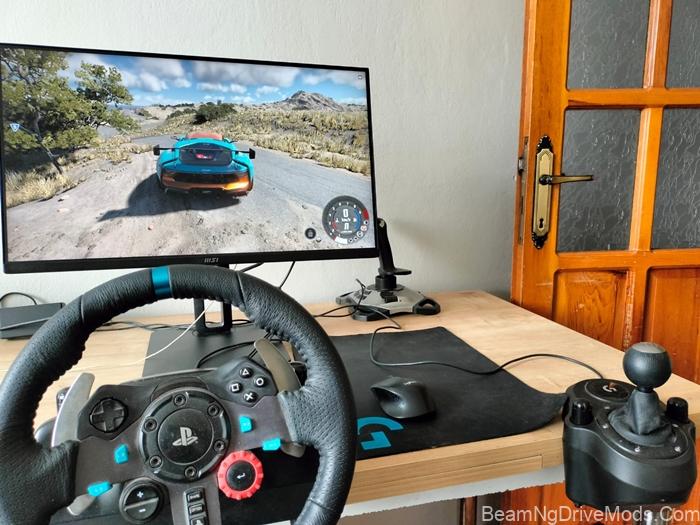
Before any mod reaches you, it goes through our own test rig. We play it, push it to its limits and make sure it works, and we have a lot of fun along the way.
This is a typical mid-range gaming setup, so if a mod runs well for us, it should run well for most players. Very large maps and high-detail vehicles may still need more resources on lower-end systems.
Step 1: Virus Scan Before Anything Else
Every file is scanned with VirusTotal right after download, before it touches our game. We do this for our own safety first, and for yours.
- RAR archives are extracted and repacked as ZIP before scanning, so the archive format can’t hide anything from the scan.
- Any file flagged as infected is never opened in the game and never published.
- On posts where the VirusTotal report is available, you’ll find a direct link to it next to the download details.
Step 2: Ready-to-Use Packaging
We repackage every mod as a single ZIP file that works as-is. There is no need to extract anything. You can install it in one of two ways:
- Game folder (the method we use in our tests): put vehicle ZIPs in
BeamNG.drive\content\vehiclesand map ZIPs inBeamNG.drive\content\levelsinside the game’s install folder. On Steam, this is usuallyC:\Program Files (x86)\Steam\steamapps\common\BeamNG.drive\. - User mods folder: put the ZIP in the mods folder of your BeamNG.drive user folder. You can open it from the launcher via Manage User Folder > Open. Both vehicles and maps go in this folder, and mods placed here are kept safe during game updates.
Note: files in the content folder may be removed when the game updates or when you verify the game files on Steam, so you may need to add them again after an update. See our How To Install guide for step-by-step instructions.
Step 3: Visual Check
We load the mod and inspect it from every camera angle, inside and out.
- Not published: mods with broken or missing textures, and mods with wheel problems, such as wheels that sink below the road surface.
- Published with a note: older mods often have low-quality interiors. We still share them for players who want them, but we don’t hide this.
Step 4: Driving and Speed Test
Most vehicle mods come with several configurations, such as standard, premium, drag or drift versions. We drive at least 4–5 configurations of each mod.
The maximum speed listed in our posts comes from our own test runs, not from the mod description.
Step 5: Game Version
Each post shows the BeamNG.drive version the mod was tested on (for example, “Tested on v0.39”). BeamNG.drive updates can break older mods, so if a mod stops working after an update, please let us know in the comments.
Download Mirrors
Files are uploaded to 2–3 different hosting services, so a download is still available if one link goes down. When the author has an original release page, we link to it as well.
What “Tested” Does Not Mean
Our tests are done on the game version shown in each post, on the hardware listed above. We can’t guarantee that a mod will work with every other mod you have installed, or on future game versions. If you run into a problem, a comment on the mod’s post helps us and other players.
Mod Authors and Removal Requests
We always credit the original author. If you created a mod shared here and want it removed, or if a paid mod was shared by mistake, contact us through our Contact Us page and we will remove it as soon as we see your message.
Watch Our Tests
We record our tests and publish around three mods a day on our YouTube channel. You can also follow us on TikTok, Facebook and Pinterest.
Recent Comments